Guests
Guests in the main menu is the property's own address book. Every booking creates a guest record — you do not have to add anybody here first — and this is where those records are kept, searched, corrected and, when the time comes, removed.
The guest list
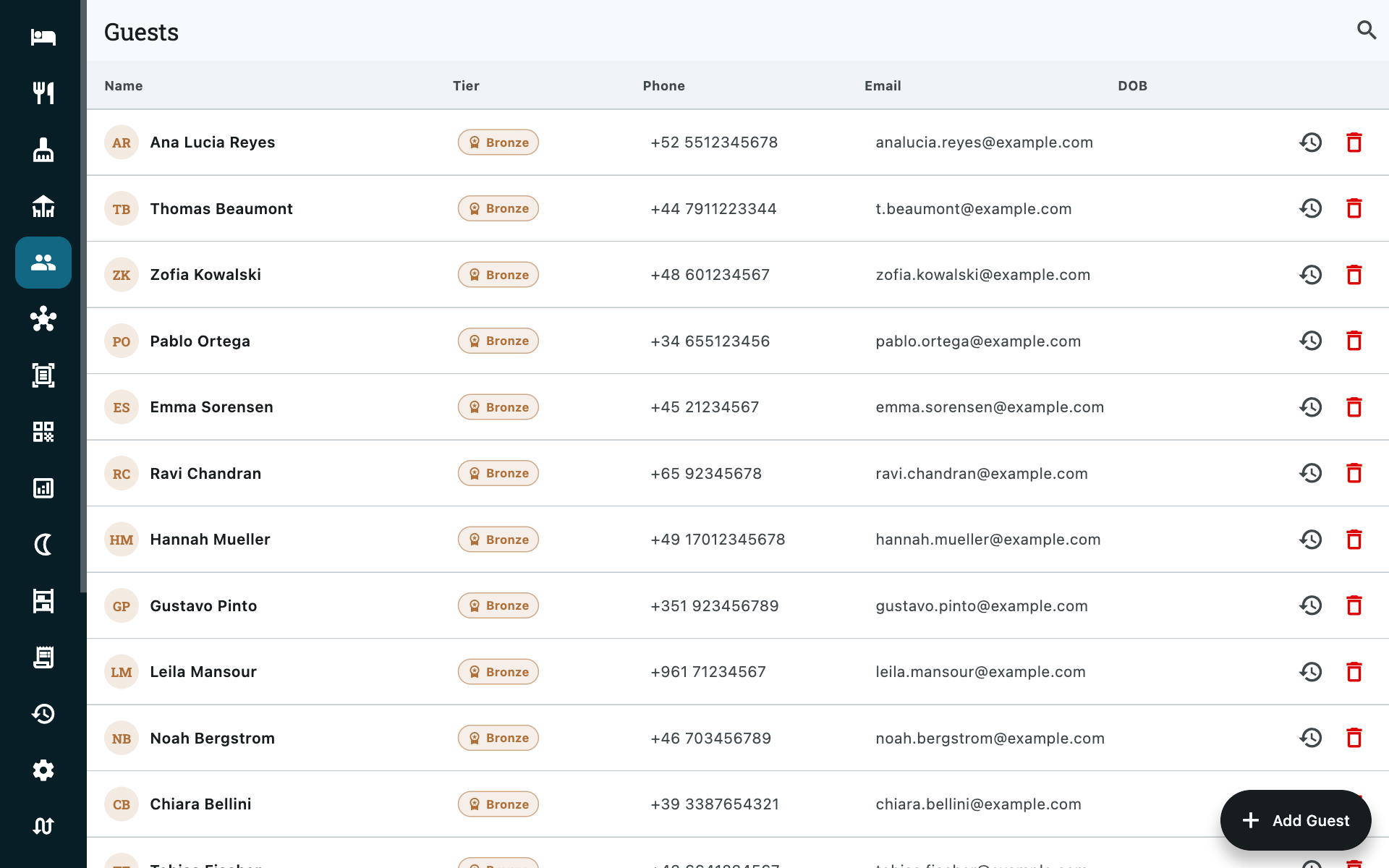
One row per guest, newest first: Name, loyalty Tier, Phone, Email and DOB.
The search box matches on name or phone number and starts working at three characters, so a partial number off a caller ID is enough to find somebody.
| Action | Where |
|---|---|
| Add Guest | Bottom right. Only needed for somebody who has not booked yet — a corporate contact, a walk-in you are expecting. |
| Past bookings | The row menu. Every stay this guest has had, with dates and room. |
| Delete | The row menu. See Deleting a guest. |
You rarely start here
Taking a booking searches the same list from inside the booking form, and adds a guest without leaving it. Come to this screen when the guest is the subject — checking a regular's history, fixing a misspelt name that is now on three bookings, attaching an ID.
The guest record
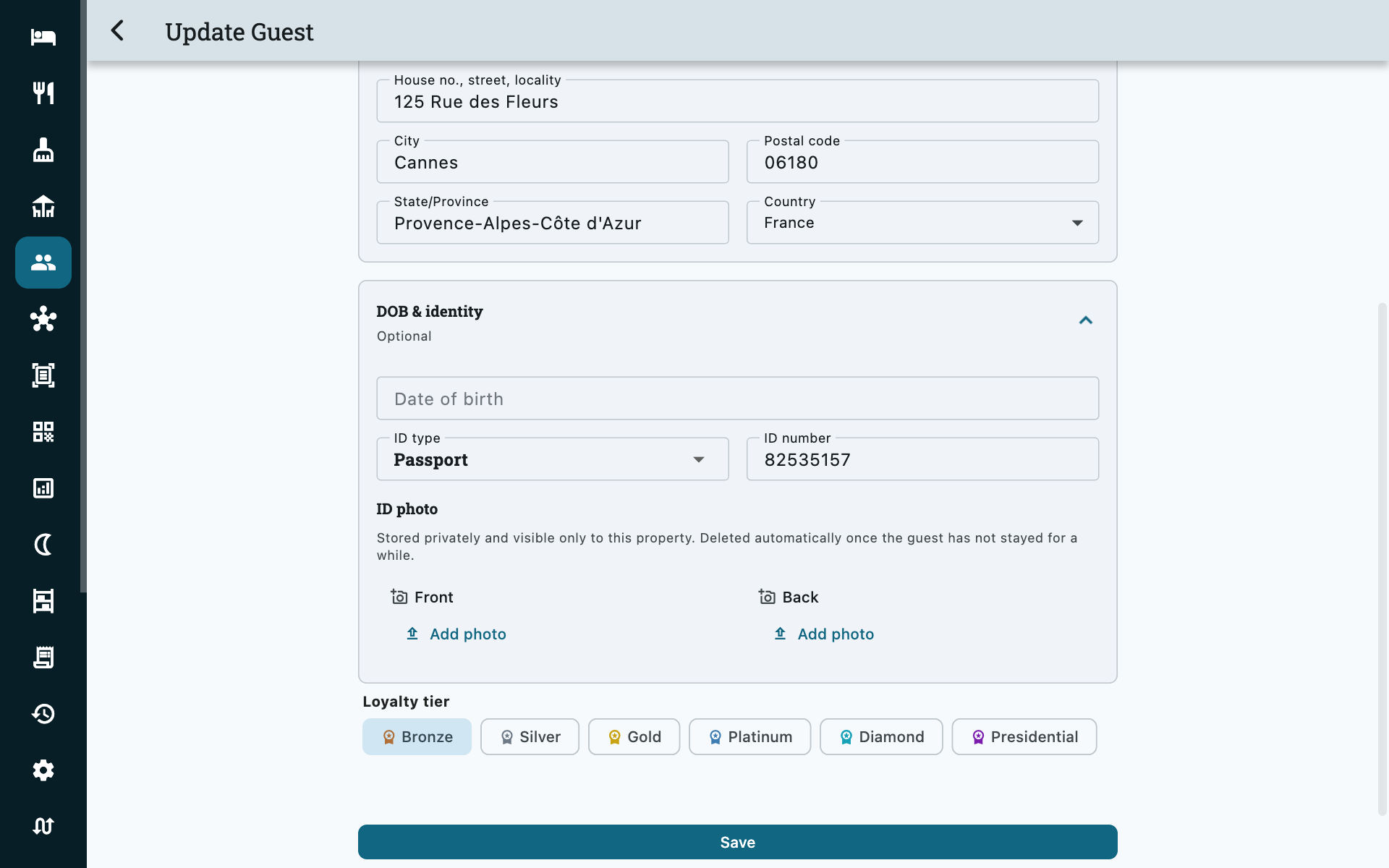
| Field | Notes |
|---|---|
| Name | Also the name that prints on the invoice. |
| Phone | Country code and number, kept apart so search works on either. |
| Used for the booking confirmation. | |
| Address, city, state, pincode, country | The address that appears on a registration card or a GST invoice. |
| Tax number | For a company guest being billed. Leave empty for an individual. |
| ID type and number | See the table below. |
| Date of birth | Optional; some jurisdictions want it on the register. |
| Loyalty tier | See Loyalty tiers. |
| Notes | Anything the next person on the desk should know. |
| Food allergies | Worth filling in even for a one-night stay. |
| Special requests | Extra pillows, late check-out — the standing preferences of a regular. |
| Tags | Labels you define yourself — see Tags. |
Notes, Food allergies and Special requests sit together under Notes & preferences on the guest form. The section opens by itself when there is already something in it, so a recorded allergy is never hidden behind a collapsed bar.
ID types
National ID, Passport, Driving License, Citizenship Card, Income Tax Card, Corporate ID, Overseas Citizen Card, Ration Card, Government ID, or Other.
The type and the number are just text on the record. The photograph of the card is a separate and much more carefully handled thing — below.
ID documents
Open a guest and you can attach a photo of their ID card, front and back. Two is the cap: an Aadhaar or a driving licence carries the address on the reverse, and nothing needs a third.
| Button | What it does |
|---|---|
| Add / Replace | Pick an image. Replacing overwrites that side and destroys the old file. |
| View | Opens the stored photo. |
| Remove | Destroys it. |
Accepted: JPG, PNG or WebP, up to 10 MB. Whatever you pick is re-encoded to JPEG and scaled down before it leaves the device, so a raw phone photo is fine.
How these are stored, and why it is different from your other photos
A scan of somebody's passport is not a property photo, and Zitlin does not treat it like one.
- Nothing is shown until somebody asks for it. The guest screen knows only whether a document exists.
- View mints a private link that dies after one minute. There is no lasting address for the image — nothing that could sit in a browser history, a log or a forwarded message and still work tomorrow.
- The file never passes through a page anyone else can reach, and it is never sent to your OTAs. See Channel manager.
- Every capture, every view and every deletion is written to the audit log in Staff Accountability with the guest's name and who did it — including the views. Looking at a stored ID is itself an event.
Viewing one asks for a PIN
On a property using staff sign-in, opening a stored document asks for the acting person's PIN, exactly as voiding an invoice does. Scanning an ID happens at check-in with the guest standing there; re-opening one three weeks later is the act worth stopping somebody for — and the trail then names a person rather than a tablet.
Who can do what
| Action | Lowest role |
|---|---|
| Add or replace a document | Front Desk |
| View one | Front Desk (plus a fresh PIN) |
| Remove one | Rooms Manager (plus a fresh PIN) |
Removing is a tier above adding on purpose: a receptionist who took a blurry scan simply takes another, which replaces it and leaves a record saying so. Throwing one away outright is a manager's call.
They delete themselves
Stored ID photos are deleted automatically once you no longer have a reason to hold them. The clock runs from the guest's last stay, not from the day the photo was taken, so a regular is never asked to hand over their passport again every few months.
The default window is 180 days. It can be set anywhere from 30 days to five years, or switched off entirely for a property whose local record-keeping duty requires that — how long a hotel must keep ID records is local law, not a product decision, so ask support to set yours rather than assuming the default fits.
Loyalty tiers
Every guest carries one of six tiers — Bronze, Silver, Gold, Platinum, Diamond, Presidential — starting at Bronze. Set it on the guest record; the tier then shows as a coloured badge wherever that guest appears, including the folio, so the desk knows who they are dealing with without opening anything.
Zitlin does not promote guests automatically or attach any discount to a tier. It is a label your team applies and reads — what it means is your policy.
Where the notes follow the guest, and where they stop
Filled in, they ride the guest card — so they are on screen at every booking that guest makes, on the folio, the room booking and an event booking, without anyone opening the guest record. Allergies show red, special requests blue, notes green, in that order: an allergy is safety, a request is service, a note is context.
They stop there. A food allergy is not printed on a room-service kitchen ticket, and a special request is not shown to housekeeping — so tell them as well. What the record gives you is one place to look it up and a note that survives the guest's next booking.
Past bookings
Past bookings from the row menu lists every stay the guest has had, with dates and room. It is the fastest answer to "have they stayed with us before, and in what?" — and to the returning guest who wants "the same room as last time".
Deleting a guest
Deleting a guest removes them from the list and destroys their ID photos immediately — the images are not left waiting for the retention job.
The record itself is retained but hidden. It has to be: their invoices and bookings hang off it, and those are documents you are required to keep. What you lose is the guest in your address book; what you keep is the history.
Deleting a guest is an Accountant-level action.
Common questions
A guest is in the list twice
Merge is not available yet. Correct the record that carries the bookings — the two will have different stays behind them, and Past bookings shows which is which — then delete the empty duplicate.
Can housekeeping or a waiter see guest details?
No. The Guests screen starts at Restaurant Manager for reading and Front Desk for editing, and stored ID documents need Front Desk plus a PIN. Housekeeping sees room numbers and, on the rack, a guest's name — never an address, a phone number or an ID.
Does the ID photo go to Booking.com with the reservation?
No. Nothing about a stored document leaves Zitlin — see Channel manager for the full list of what does not sync.
We are inspected and asked to produce ID records
Open the guest and use View. The audit log will show that you did, which is normally exactly what you want on an inspection day: it records that the check happened.
If your retention window has already passed, the photo is gone — deliberately and permanently. Set the window to match your local duty before you need it, not after.
Can I turn the automatic deletion off?
Yes, but check your local record-keeping duty first. Ask support; it is deliberately not a switch on a settings screen that anybody can flip.